Phoenixville Library

Creating an app to brings a local libraries secret resources to the public eye.

Client

Phoenixville Library

Services

UI & UX Design

Industries

Library and information services

Duration

2 week sprint

The Phoenixville Library is more than just books—it offers a wide range of rentable items, from musical instruments and kitchenware to medical equipment. Most dont know that the opportunity to rent these out even exist.

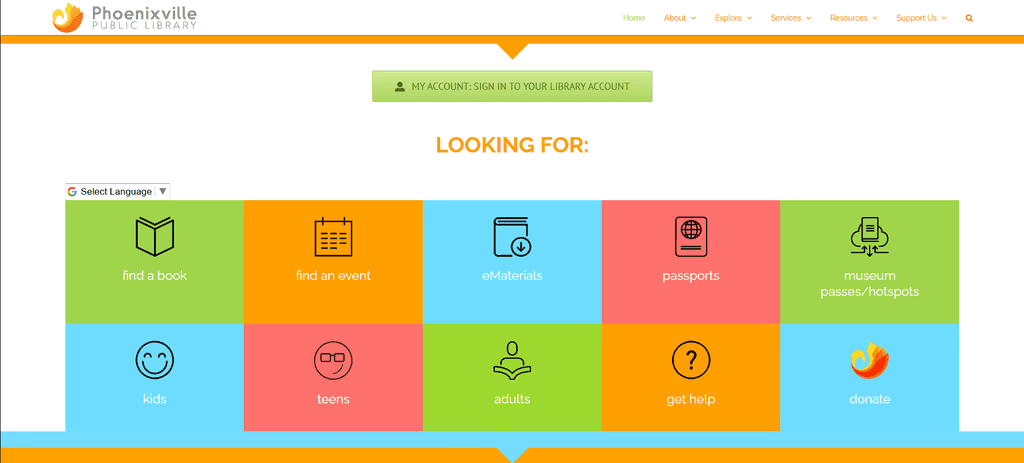
The current site of the library makes it hard for users to even get to the page to see these items. But even if they can get there it feels very clunky and out of date. Items are left uncategorized and no way to see if the items is even available to rent out. But most importantly theres no way to reserve these items online.
The Challenge

We were challenged with the task of making it easier for users to explore, discover, and rent out these items without any hassle.

Our Solution

We designed a mobile app that highlights this gem of a program as well as some others that library users may not be aware of!

By now your probably wondering who this elusive "we" is I keep talking about, well I partnered with 3 other UX Designers for this whole process.

Research

With a limited amount of time to complete this task, we decided to to split up the work initially. Yeajin and Myself took charge on coming up with questions that helped us better understand what library goers thought of the space, and their overall experience using their services.

While Anna and Savannah took lead on our Competitive and Comparative Analysis from other libraries.

We conducted a series of user interviews both in-person and online. I volunteered and took a trip down to the Phoenixville library itself to get interviews with its real users.

When I visited the Library and asked the employee at the test for permission to interview patrons, I was redirected several times until I was led to the libraries director’s office. Once there, I provided a detailed explanation of my project and its purpose. After addressing her concerns, she approved the interviews, and I was set loose on the population of the Phoenixville library.

In total we got 8 interviews, 4 from library employees and 4 from actual library users. After transcribing, and organizing all the statements into an Affinity map.

The insights gathered from these interviews showed that users wanted:

  • An easily accessible and categorized list of items in a feed 

  • The ability to see availability at a glance

  • Alerts for when unavailable items are returned back to the library

  • A way to quickly access their library card. 

  • Guides on how to use the rented products if setup is needed.

  • And lastly, the ability to pay for any late fees

The experience also highlighted an interesting point: While many people were open to answering questions, some became hesitant—or even declined entirely—when asked if the interview could be recorded.

Synthesis

As a group we discussed how these could form into a new persona so we could get a better understanding of who exactly we were making this for. With much back and forth debate and plenty of time staring at our created "I" statements to see the connections, we created:

Alex Rivera

Age: 32
Occupation: Freelance Designer

Background:
Alex loves the library as a vibrant community hub and visits often to work, attend events, and explore resources. However, navigating what’s available can be difficult, especially if she doesn’t know the exact name of a resource. Passionate about lifelong learning, she frequently checks out books on design and entrepreneurship but is most excited by non-book items like cameras, graphic tablets, and 3D printers. Poor website navigation and limited promotion often lead her to miss out on valuable resources.

Needs

  • Easier Discovery:


Find and rent non-book resources faster.

  • Better Navigation:


No need to know exact names.

  • Clear Availability:


See real-time updates on item wait times and availability.

  • Community Connection:


Meet like-minded people through events.

Needs

  • Easier Discovery:


Find and rent non-book resources faster.

  • Better Navigation:


No need to know exact names.

  • Clear Availability:


See real-time updates on item wait times and availability.

  • Community Connection:


Meet like-minded people through events.

Frustrations

  • Hard to Find Resources:


Tough to explore without exact names or titles.

  • Confusing Navigation:


Hard to browse and find resources

  • Low Visibility: 


Library services, events, and rental options aren’t well-promoted.

  • Messy Search:


Lacks useful filters, making it hard to find the right resource.

Frustrations

  • Hard to Find Resources:


Tough to explore without exact names or titles.

  • Confusing Navigation:


Hard to browse and find resources

  • Low Visibility: 


Library services, events, and rental options aren’t well-promoted.

  • Messy Search:


Lacks useful filters, making it hard to find the right resource.

Goals

  • Effortless Discovery: 


Find and access library resources and events that align with her interests

  • Better Resource Promotion:


Stay informed about new tools, events, and services.

  • Clear Navigation: 


Filters that make renting non-book items frictionless.

  • Seamless Experience: 


A system that works for her, not against her.

Goals

  • Effortless Discovery: 


Find and access library resources and events that align with her interests

  • Better Resource Promotion:


Stay informed about new tools, events, and services.

  • Clear Navigation: 


Filters that make renting non-book items frictionless.

  • Seamless Experience: 


A system that works for her, not against her.

Using Alex as a team we came together to create a problem statement that best incorporated her entire being:

“Alex, an active library user, faces challenges in easily discovering and accessing the library's resources beyond books. Because of poor website navigation, limited promotions, and unpredictable wait times, it makes it difficult for her to fully utilize the library’s offerings, hindering her ability to engage with the community and advance her learning.."

To continue the momentum as a team we wanted to go through a MSCW using a feature inventory supplemented from the duo that took on our comp analysis' and what we learned from the people of the world.

After that we had an idea of what we needed so to help guide us forward we created a sitemap to help us with our designs and get an understanding of how the whole site would be appropriately mapped out.

After we finished the sitemap we discussed how the flow of someone renting out the objects, which we came to a quick realization that its more or less the same as an ecommerce site.

So we created Alex's flow from there.

After we got to this point we had so many varying ideas for how we should display our page, so we broke off and decided to sketch out our ideas and reconvene later as a small show and tell to each other.


We each made our sketches, came together and went through each persons sketch idea and debated amongst ourselves for the style that made the most makes sense for Alex's flow.

Ideation

After we came to an agreement on how we saw the overall site, we decided the best way for us to get the most done with the time we had, was to divide up the pages and come up with wireframes for our page.

Addressing the user needs.

After implementing the improvements, we finalized our wireframes, and created Hi-Fi Mockup using assets collected from the libraries site. Which we turned into a working prototype to visualize what Alex would see through her journey. Feel free to interact with it below!

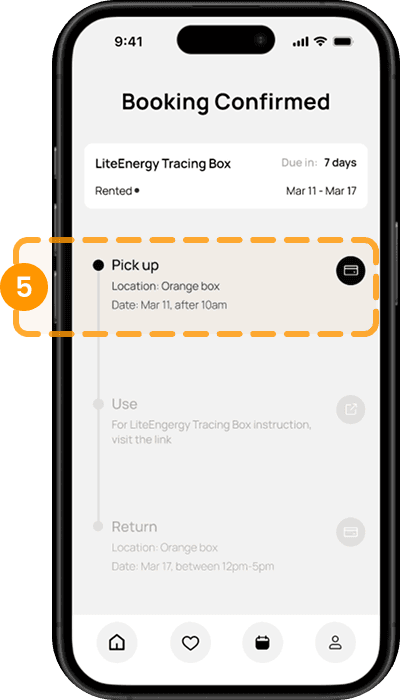
Lastly, we found that users did not realize that clicking the ‘card icon’ would open the Library Card.

To address this, we added an additional guide to indicate that the icon is interactive.

Here is the most common issue we found, confusion regarding our Booking Confirmation page.


After clicking the “Borrow” button on the PDP, users are directed to this ‘Booking Confirmation page’ which includes next-step instructions.
Our participants thought this page was only accessible once, which isn’t our intention since users need to access it again and again when they pick up, use, or return items.

So to solve this, we separated the “Booking Confirmation” page from a newly created “booking details” page, making the information accessible at any time.

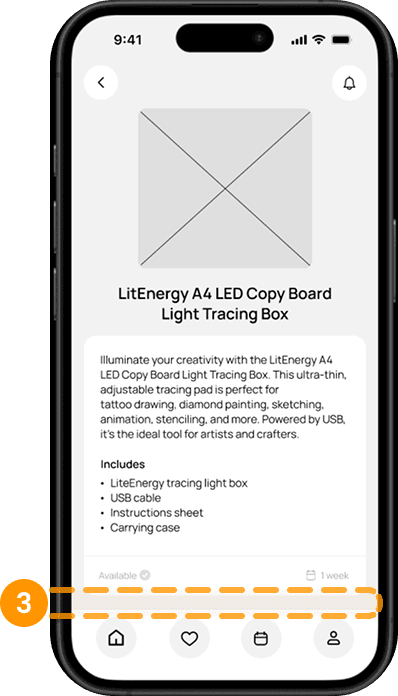
Another issue on our PDP was that users struggled to find the “Borrow” button since it required scrolling down to access.

To fix this, we adjusted the layout, allowing the button to be visible without scrolling.

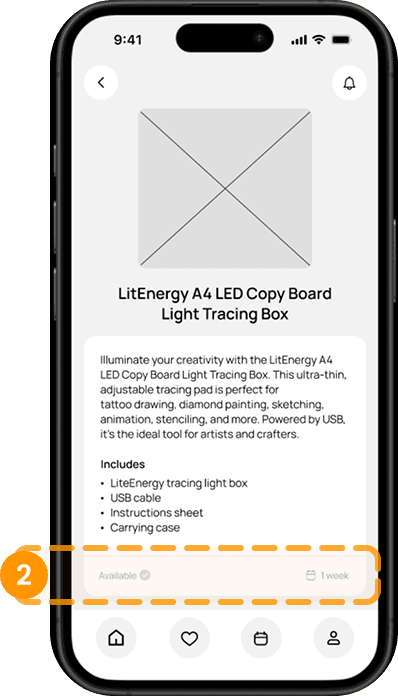
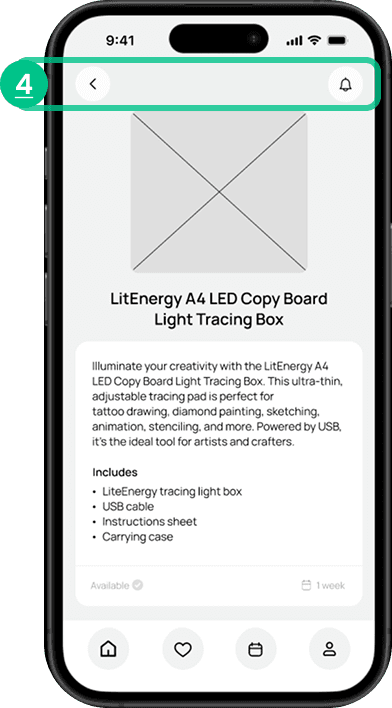
Next, on our PDP -
Users misunderstood the status of availability, due to the light grey colored text.
Also, users didn’t notice that “1 week” refers to available rental duration.

To resolve this, we darkened the text for better readability, and clarified that the item is available for a 1-week “rental” period.

First, on the Home Page, users were confused about the “days” displayed in the right corner of “Recently borrowed Item section.”
It was meant to indicate the days left until return, but it wasn’t clear.

So to improve clarity, we added contextual guidance, changing it to “Due in # days.”

Using these initial wireframes, we conducted five usability tests, asking participants to: find and borrow a “Light tracing box” using the app.

We then identified some shared comments and areas of confusion that needed improvement.

  1. Allowed library card accessible through the app, make it easily accessible when they rent / return items.

  2. Provided an item usage guide / link to the official product guide website

  3. Allowed late fees payable through app, make it visible to give user a sense of responsibility to return items on time.

  1. Sorted Library’s offerings into four main navigation and made it accessible at the main page.


  2. Categorized Library of things by theme & similarities.


  1. Ensured users can identify item availability before proceeding to borrow.


  2. Allowed users to set an alert for unavailable items they’re interested in, notifying them when they become available.
Final Result

Reflections

This whole experience was honestly amazing. Our team worked really well together, and everyone brought something different to the table, which made things super fun and interesting.

We learned a lot from the project—like how to work as a group on tasks we’re used to doing solo, and how to do in-person interviews with strangers, which definitely pushed us out of our comfort zones and helped us think on our feet. It was also the first time we all worked together on visual designs and came up with solutions as a team. We got better at giving and taking constructive feedback, and learned how to compromise and stay open to each other’s ideas. Overall, it was such a great experience and we all grew a ton from it.